Friday, April 07, 2006

NC LIVE Insights


* LearningExpress E-books
* New NetLibrary IT titles

LearningExpress E-books
================
These online books are a little-known resource available to the NC LIVE community. This resource provides study guides and test-preparation books to help people prepare for high-stakes tests—to advance in school, or pass licensing, certification, or competitive entry-level exams.
Examples of titles include:

Acing the SAT 2006
Goof-Proof Interviews
Reading Comprehension Success in 20 Minutes a Day
Webmaster Career Starter 2nd Edition
Teacher Career Starter 2nd Edition
and many others.

To view these books, choose "LearningExpress Library" from any of the NC
LIVE menus, sign in (create a LearningExpress account first if
necessary), then click on E-books. Search for a topic of your choice. A
complete list of all the E-books is located on the NC LIVE "Library
Staff Resources" page.

New NetLibrary IT titles
================
NC LIVE has added over 200 new IT titles to our ebook collection. These new titles are integrated into the current collection, so continue using NetLibrary as usual to find these new titles. A complete list of these March 2006 additions is located on the NC LIVE "Library Staff Resources"


Tuesday, March 14, 2006

NC LIVE Insights for March

NewsBank Special Reports
================
Newsbank offers topical reports taking information from news headlines
around the world. Recent topics include "Year in Review -- 2005", "2006
Winter Olympics", "World Health", and this month's feature "Women's
History" in celebration of March being Women's History Month.

If you are accessing NC LIVE from an IP authenticated location the URL
below should work. Otherwise click on the left side navigation and
under "More Resources" you will see "Special Reports".

http://infoweb.newsbank.com/iw-search/we/Static/?p_product=SR&p_theme=current&p_action=home&p_nbid=


Britannica Newsletters
================
Britannica offers topical newsletters delivered right to your email box.
You can select to subscribe to the Public Library or Academic edition.
These newsletters will help you tie your electronic resources to
topical programs you may offer at your library. See a sample of the
current March 2006 newsletter celebrating Women's History month:
http://newsletter.eb.com/search/newsletter_mar06.html

Monday, March 13, 2006

Learning Express = Basic Skills Success!

One of the many resources available through your GTCC library is a NC LIVE database called Learning Express. Learning Express is one of the best online resources around for enhancing the learning experience for GTCC Basic Skills students.

The first step is for the new Learning Express user to create a Learning Express account through any GTCC computer. Once that is done, the user can access Learning Express from any Internet capable computer: at home, another library, or from work. Creating a Learning Express login and password is simple-there are no strange login or password requirements, like having 4 Upper Case Letters, 5 Lower Case Letters, and 7 numbers and punctuation symbols. No, the Learning Express login and password can be something as plain as your name and birthday-simple and easy to remember. I suggest that if a user already has an email account that they just use their login and password for that, and avoid the hassle of having to create and learn a new one.

Once in Learning Express the new user can see immediately there is a wide range of subject area modules to choose from. Some of special interest to Basic Skills students, staff, and faculty would be as follows:


  • GED

  • Math Skills Improvement

  • Reading Skills Improvement

  • Writing Improvement Program

  • US Citizenship

  • Skills Improvement with Spanish Instructions

  • Job & Career Success Skills


There are many others, but this gives you some idea of what’s available.

The easiest way to access Learning Express the first time is to go through the library web site at http://webster.gtcc.cc.nc.us/library/

Then choose Online Resources (the computer icon.)

Then scroll down to the Alphabetical Listing of Databases area, and click on the “L” button.

Learning Express will be the first link on the next page. Click on that link to get started.

As always, please let library staff know if you have any questions, or if you need any assistance getting started.

Experience Basic Skills Success with Learning Express!

Friday, March 03, 2006

March Ebook of the Month is BAD!!

Check out NetLibrary's ebook of of the month -
Bad: Infamy, Darkness, Evil, and Slime on Screen


How can bad be so good? From Nosferatu to Tom Ripley, from evil villains to empires of evil, from psychotic slashers to bloodthirsty aliens, violence, infamy, and slime has become an expected staple of the Hollywood diet. In the March eBook of the Month, the contributors to Bad explore a wide range of genres and use a variety of critical approaches to examine evil, villainy, and immorality in twentieth-century film.

To read this ebook, click on the link below:
NetLibrary eBook of the Month

Saturday, February 25, 2006

Fish Love to Read!


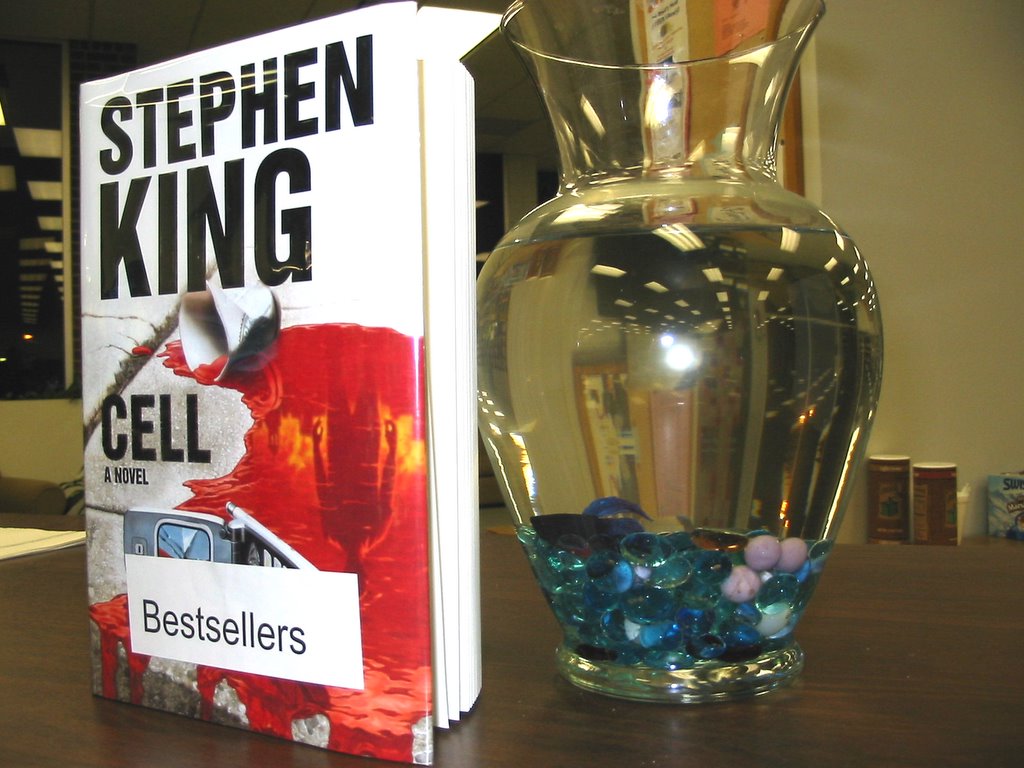
Sammy, the Library fish at Jamestown, loves to read the latest fiction. He's pictured here reading Cell by Stephen King which is currently #2 on the New York Times Best Seller List. Come check out Cell and other best sellers at the front desk in the Jamestown campus Library. If he's not too busy reading, Sammy may be able to recommend something!

Not in Jamestown? Request a best seller at the Greensboro or High Point campus Library, and if it's available it will be at your location in a day or two for you to check out.

See other titles on the New York Times Best Seller List at:
http://www.nytimes.com/pages/books/bestseller/index.html

Wednesday, February 15, 2006

We have new DVDs to help you prepare for the GED!

The libraries at the High Point and Greensboro campuses both received new sets of DVDs to help students prepare for the GED. These may be checked out by faculty or students with a valid student ID or library card.

Titles in the series include:

GED: Language Arts, Reading
GED: Language Arts, Writing
GED: Mathematics
GED: Calculator Essentials
GED: Science
GED: Social Studies

Some of these are multiple-DVD sets. Useful for classroom instruction or for individuals preparing to take the test. They show you the types of questions that will be asked on the exam, and discuss the major subject areas that will be covered.

Ask at the desk at your library for more information, or to check out these DVDs!

Wednesday, February 08, 2006

Basic Reading Series for Adult Basic Education Students in the Wendover LRC

We have a new set of books in the Wendover Campus LRC (Adult Education Center, Rm. 224, second floor) designed especially for adults learning to read. This is the Contemporary's Reading for Adults-Easy Reading for Adults Learning to Read series, call #428.6.

This series is designed for adults reading on a k-5 grade level, or for adults learning to read and speak English. The books are short, and usually contain no more than 1-3 lines of text per page. They deal with real life situations, and are designed to be easy to read while being appropriate for adults in content.

Here are some example titles from the series:

  • Laid Off
  • Jobs We See
  • Job Hunting
  • Group Therapy
  • The Grocery Store
  • A Good Parent
  • The Good News and the Bad News
  • Good Moves
  • Getting Up on Time
  • Earning Extra Money
  • My First Real Job
  • My Daily Schedule
  • When I Have a Problem
  • What Worries Me
  • Third Shift
  • The Temporary Service
  • Stress
  • Starting Over
  • Where Does Our Money Go?
  • Old Car

This is not an exhaustive list, but it should give you an overall idea of the content. These books are also available at the HP LRC.

I encourage you to utilize these resources. Sometimes it can be difficult to find material suitable for practice reading that is also appropriate in content for adults, i.e., material where the content is not aimed at children! Contemporary's Reading for Adults addresses both of these concerns. Please take advantage of these books.

Please contact me if you have any questions. I can be reached at 334-4822, x4225 or x4203, or email bkburkhead@gtcc.edu.

Friday, February 03, 2006

NC LIVE Home Page Changes. Black History Month

Changes to the NC LIVE home page
On Monday morning, February 6th, NC LIVE will roll out a new version of
the NC LIVE home page.

Based on usability testing students and patrons, and surveys conducted
with library staff from around the state, we are developing a host of
changes for the NC LIVE web site over the next several months.
The first of these is a move to make the home page more functional by
bringing popular features front and center.

* "Browse by Subject" and "Browse by Type" will appear in the left side
bar. Some of the current features, including the "Featured Resource"
will disappear.

* Below the EZ Search box will be the addition of "Need a specific
resource? Use our Alphabetic list." and "Need a specific title? Use our
journal and magazine search feature."

If you have any questions or comments feel free to let the Help Desk know.


Black History Month Resources through Encyclopedia Britannica

NC LIVE users have access to Encyclopedia Britannica's Guide to Black
History website.

This website was recently updated and presents a vast array of articles,
hundreds of images, and a wide assortment of audio clips, film clips,
and multimedia presentations. The timeline traces two millennia of black
history, and the browse features enable you to pinpoint the central
people, places, topics, and events covered in black history. Our image
and multimedia galleries provide snapshots of black culture throughout
the ages.

You can access the website by opening Britannica Online and scrolling to
the bottom of the homepage where there is a link to Britannica
Spotlights archive. The Guide to Black History is the third selection.

Monday, January 30, 2006

NC LIVE / EbscoHOST Insights

from the NC LIVE folks:

In the month of February EBSCO is releasing a host of new features for their databases. An exact release date is unknown, but look for the changes in the next couple of weeks.

"Visual Searching"
A new "Visual Search" tab will soon appear that will provide a great complement to the traditional basic and advanced search options. EBSCO had provided a link to a 30 second flash movie for a sneak preview of this exciting new tool that they are making available to all customers at no additional charge.
http://www.epnet.com/flashViewer.php?marketID=1&topicID=407

"Clustering"
Eliminating the need to browse through Result Lists or check individual records, EBSCO's Clustering feature provides a convenient list of links (or clusters) that allows users to sort results by Subjects, Authors, or Journals (depending upon which grouping the library administrator has chosen in EBSCOadmin), along the left side of the Result List. When the clustering feature has been enabled, a list of ten clusters is displayed with the Result List. This feature must be enabled by the NC LIVE help desk.

"Database Selection From Search Screen"
EBSCO provides a convenient drop-down list, located right under the Find field on both the Basic and Advanced Search screens, of every database in the profile. Users can select a new database to search without having to return to the Choose Databases screen.

"RSS Feeds"
Researchers now have the capability to extend the usefulness and reach of the Alerts they create within EBSCOhost. Each alert can be set up as an RSS feed, allowing them to view Alert results within their RSS Aggregator, or allowing them to include these results in a web site with EBSCOhost articles.

Tuesday, January 24, 2006

New MORNINGSTAR.COM LIBRARY EDITION Now Available

Next time you’re in the library take a look at our Internet-based investing tool, Morningstar.com Library Edition, a NC LIVE resource. Morningstar takes you through the entire investing process – finding stocks and funds, evaluating them and seeing how they work together in a portfolio. It covers all stocks traded on the New York Stock Exchange, NASDAQ, American Stock Exchange and nearly 14,000 mutual funds – more than 20,000 securities in all. It provides detailed financial information, analyst reports and helps you build lists of stocks and funds based on hundreds of different criteria.

Give Morningstar.com Library Edition a try or stop by the Reference Desk for assistance.